Overview Link to section: Overview
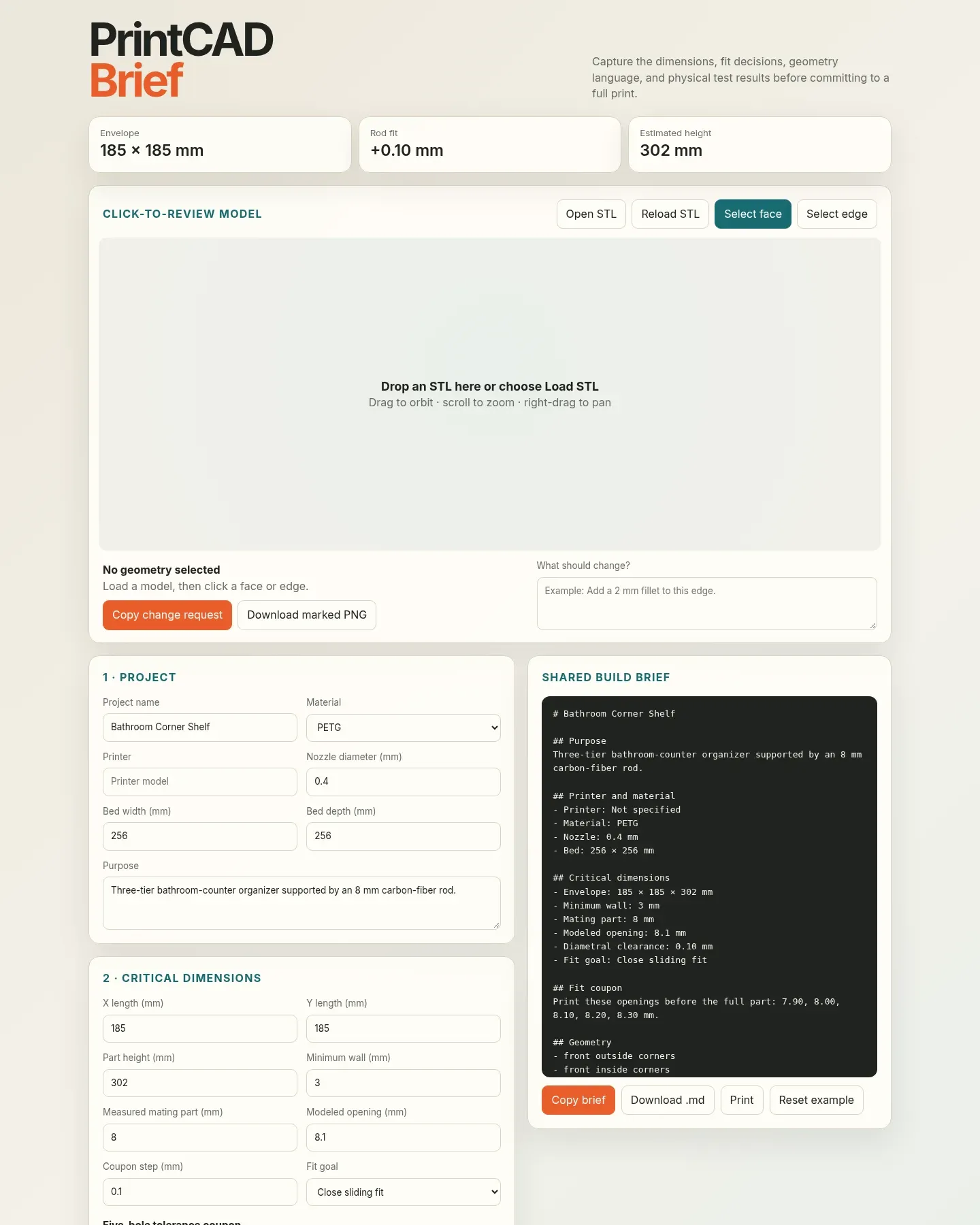
I built PrintCAD Brief to catch fit and dimension decisions before committing to a long 3D print. It gives me one place to record what a part needs to fit, which corners should change, and what a physical test showed before starting or revising a CAD (computer-aided design) model.
The built-in example uses my bathroom corner shelf. Its dimensions and pending test entry demonstrate the planning workflow; they are not evidence of a successful print.
Dimensions and fit tests Link to section: Dimensions and fit tests
The Project section records the purpose, material, printer, nozzle diameter, and bed dimensions. Critical dimensions captures the overall size, minimum wall thickness, measured mating part, modeled opening, and fit goal. The summary displays the entered footprint and height and calculates clearance—the opening size minus the mating-part size. It also compares the entered X and Y dimensions with the stated print bed.
The five-hole tolerance coupon is a plan for a small test print with several opening sizes. I choose a center opening and a step, and the tool lists five sizes around that center. The example’s 8.1 mm opening and 0.1 mm step give 7.90, 8.00, 8.10, 8.20, and 8.30 mm. It lists those dimensions for modeling and testing; it does not generate the coupon geometry.
Geometry and physical revisions Link to section: Geometry and physical revisions
Geometry language combines a checklist for inside and outside corners, wall-contact faces, and print orientation with written corner treatments and constraints to preserve. I can specify a chamfer (a beveled edge) or fillet (a rounded edge) while keeping details such as rod location, tier spacing, and wall thickness explicit.
The Print-test log has editable rows for a date, the change tested, and a result or measurement. I can add and remove tests as the design changes. The example records a rod-hole reduction from 8.5 to 8.1 mm with the result “Awaiting next test print.”
Click-to-review model Link to section: Click-to-review model
I can open or drop an STL, a triangle-mesh file commonly used for 3D printing, then orbit, zoom, and pan around it. Face mode marks an individual mesh triangle; edge mode marks an edge segment. These selections refer to the mesh, rather than editable CAD features.
After selecting geometry, I write what should change. “Copy change request” includes the model filename, selection number, point coordinates, and either a face normal (its direction) or edge endpoints, followed by my note. Coordinates refer to the STL’s original model space. “Download marked PNG” saves the viewer image with the selection highlighted, so I can share a visual reference alongside the text request.
Sharing and storage Link to section: Sharing and storage
The Shared build brief updates as I edit the forms. I can copy it, download it as Markdown (plain text with formatting), or use the browser’s print dialog. That gives me a written specification to use alongside a CAD script or send to a collaborator, including fit sizes, geometry constraints, test history, and an acceptance checklist.
Form values, checked features, and test rows save automatically in localStorage, the browser’s local storage for a page. There is no server save or device sync, and the saved brief does not include the loaded STL or viewer selection. I export the brief before switching browsers or devices.
Running it and limits Link to section: Running it and limits
The tool source is a standalone HTML file in my FreeCAD repository. Download it and open it in a browser; there is no build step. The 3D viewer uses three.js, a browser graphics library loaded from a CDN (an external file delivery service), so that part needs an internet connection. When opened as a local file, I choose the STL myself.
This is a personal planning and review tool. It does not generate CAD, modify the loaded mesh, or slice a model into printer instructions. Its bed check compares entered dimensions, and the exported acceptance checklist is a reminder for review, not automated verification of wall thickness, watertight geometry, or physical fit.
My Parametric FreeCAD Designs entry covers editable models in the same repository.