Overview Link to section: Overview
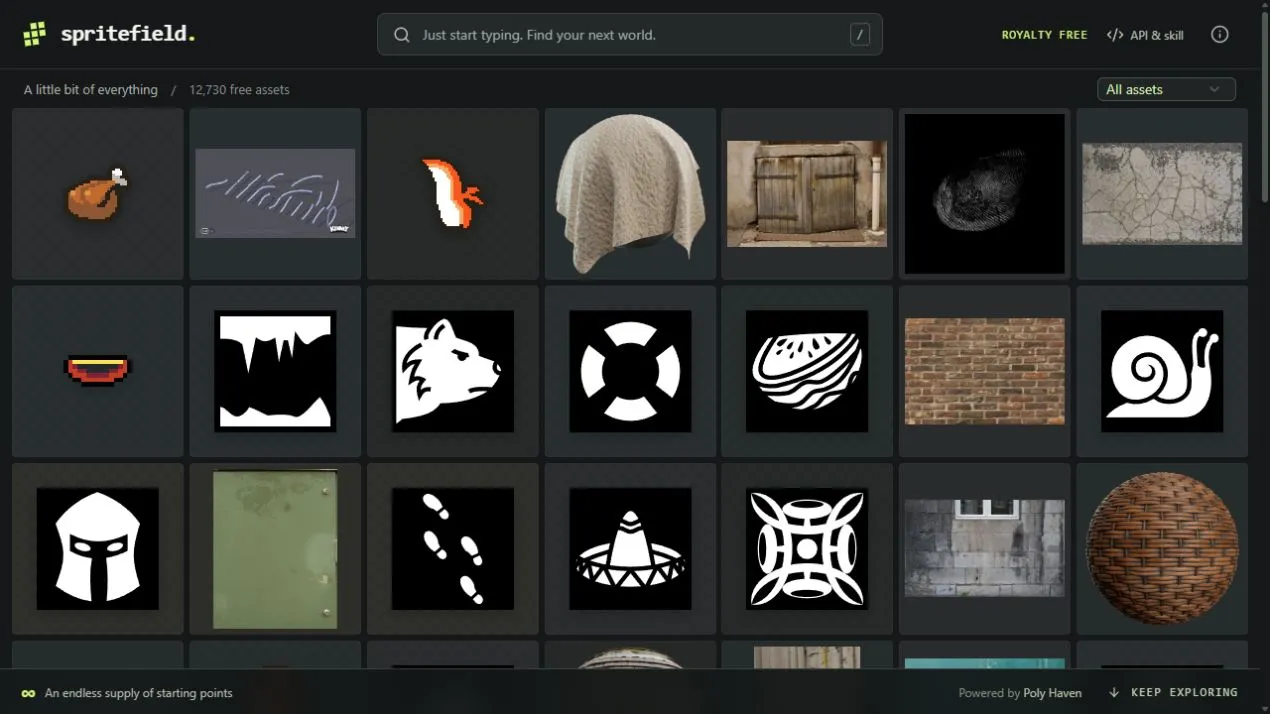
I built Spritefield as a visual search tool for game assets. Its canvas keeps previews close to the act of searching: type a query, filter by asset type, and bring relevant results into view.
The catalog includes more than 12,700 entries across individual assets and complete packs.
Browsing and search Link to section: Browsing and search
Loading a large catalog Link to section: Loading a large catalog
A virtualized grid (a grid that draws only the visible items) renders the visible part of the canvas. Lazy previews (images loaded as needed), cursor pagination (using a returned marker to fetch the next results), and continuous scrolling let a large collection remain browsable without placing every image on the page at once.
Search matches and suggestions Link to section: Search matches and suggestions
Search uses weighted SQLite FTS5 indexing (full-text search in a SQLite database, with some fields given more importance), related terms, and typo handling. When the system falls back to discovery suggestions, the interface labels that mode. A suggested asset should not be mistaken for a literal match to every term in a query.
The canvas loops back through the catalog when you reach the end.
From a preview to usable files Link to section: From a preview to usable files
Textures Link to section: Textures
The texture API (an interface for requesting asset details) distinguishes a preview from the original resource. It can resolve original photographs, archives, and separate PBR maps (physically based rendering images that describe material properties) with their role, format, and available resolution.
Models and companion files Link to section: Models and companion files
The model API returns the main model file and companion resources, or a complete pack archive. For a glTF model (a format for delivering 3D scenes and models), the companion buffer (geometry data) and texture files need to retain the relative paths described by the response.
Choosing a different model resolution refers to texture size, rather than a different mesh complexity (the amount of geometry in the model).
Checking whether an asset fits Link to section: Checking whether an asset fits
Some catalog records represent sprite sheets (multiple animation frames or graphics in one image) or packs. Texture photographs are not automatically seamless materials (textures that repeat without visible edges). The source and file details are part of deciding whether an asset fits a project.
Browser and agent interfaces Link to section: Browser and agent interfaces
People browse the same catalog that agents can query. The project exposes a public API guide, an OpenAPI schema (a machine-readable description of the API), a downloadable skill (instructions for agents), and five browser WebMCP tools (browser-exposed functions that agents can call):
search_assetsfind_texturesget_texture_mapsfind_modelsget_model_files
Search returns IDs that can be passed to the corresponding detail endpoint (the API address for that asset’s details). Following the returned cursor with the same query keeps pagination consistent.
Catalog architecture and updates Link to section: Catalog architecture and updates
The application uses React and TypeScript with a Cloudflare Worker (code running on Cloudflare’s servers) and D1 (Cloudflare’s hosted SQLite database). The checked-in catalog supplies metadata (asset descriptions and file details) for the indexed database; preview imagery remains on the providers’ servers.
Refreshing the catalog Link to section: Refreshing the catalog
I update the catalog with refresh scripts, including scripts for Poly Haven textures and models. Updates are reviewed before publishing; the site uses that saved catalog between refreshes.
The source repository includes local setup, ordered database migrations (steps that update the database structure), API generation, and catalog-update instructions.
Credits and use Link to section: Credits and use
I built the search and discovery software. The assets belong to their original creators and providers, including Poly Haven, ambientCG, Kenney, Game-icons.net, Superpowers, and Texture Ninja.
Each record carries source and license information. The software’s license does not relicense the indexed artwork; creator attribution and original terms remain attached to the asset.
Browse the live catalog or consult its API guide. The image above is a capture of the public catalog.
FAQ
What assets can I find in Spritefield?
The catalog contains sprites, icons, textures, models, and complete packs, with previews linked to original files and source and license details.
Can agents search the catalog?
Yes. The project provides a public API guide, OpenAPI schema, downloadable skill, and five browser WebMCP tools for searching and retrieving texture and model details.
Does the software license cover the artwork?
No. Each record carries source and license information. The assets belong to their original creators and providers, and their original terms remain attached.
Does choosing another model resolution change its geometry?
The model resolution choice refers to texture size rather than mesh complexity.