Overview Link to section: Overview
I built OpenMic as a native Windows and Linux app (software that runs directly on each operating system) for microphone cleaning and a soundboard, which plays selected audio clips. It processes live microphone audio, mixes optional local clips, and sends the combined result to a selected output device.
A virtual audio cable, a software connection that passes audio between applications, lets another application use that processed result as its microphone input. Audio processing—the digital signal processing (DSP) that changes or cleans the sound—stays on the computer; the application does not need a hosted inference service (a remote service running the noise-cleaning model).
Audio pipeline Link to section: Audio pipeline
Formats and noise suppression Link to section: Formats and noise suppression
Devices open in their native formats. OpenMic resamples audio (changes its sample rate) into a 48 kHz processing core. That rate means 48,000 audio samples per second. DeepFilterNet 3 handles noise suppression by default, with RNNoise, an open-source noise-suppression library from Xiph, as a lighter alternative.
OpenMic converts the audio as needed for the chosen output.
Processing controls Link to section: Processing controls
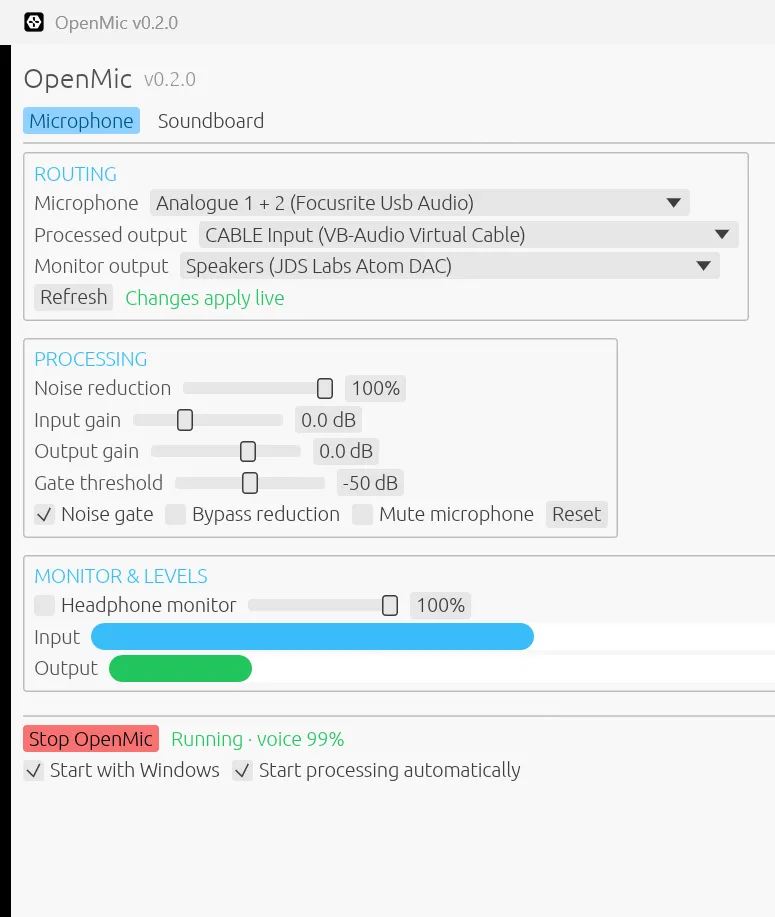
The controls expose different stages of the signal path (the route audio takes through processing):
| Control | Purpose |
|---|---|
| Input gain (level adjustment) | Adjust the microphone level before processing |
| Noise reduction | Mix between the original and cleaned signal |
| Noise gate (a cutoff for quiet audio) | Suppress audio below the selected threshold |
| Output gain (level adjustment) | Set the level leaving the processor |
| Bypass (skip processing) | Compare with processing disabled |
| Microphone mute | Silence voice while leaving the soundboard available |
Input and output meters, together with a voice-probability readout (the processor’s estimate that the sound is speech), make it possible to see what the processor is receiving and producing.
Routing into a voice application Link to section: Routing into a voice application
On Windows, I route audio through VB-Audio Virtual Cable:
- Select the physical microphone in OpenMic.
- Choose CABLE Input as the processed output when using VB-Audio Virtual Cable.
- Select CABLE Output as the microphone in the receiving application.
- Check the meters and adjust gain before adding more processing.
- Use headphones when enabling the separate headphone monitor (listening to the output through headphones).
The Input and Output names refer to opposite ends of the cable. A common routing mistake is choosing the same end in both applications.
When trying OpenMic, disable any second noise suppressor, such as Discord’s Krisp noise-suppression feature, to hear what OpenMic is doing on its own.
Soundboard behavior Link to section: Soundboard behavior
The Soundboard tab accepts local WAV, FLAC, OGG, MP3, and AIFF clips through Symphonia, an audio-decoding library that reads the clip files. Symphonia is written in Rust, the programming language OpenMic uses. Clips have their own volume and mix into the processed output.
Device changes and saved settings Link to section: Device changes and saved settings
Device changes hand the stream to a new engine while preserving the clip’s playhead (its current playback position). Microphone mute and soundboard playback are independent, so muting a conversation does not unexpectedly stop a playing clip.
Settings and the soundboard list persist between runs. Optional Windows startup and automatic processing make the app usable as an everyday routing tool.
Linux Link to section: Linux
I also ship a native x86_64 Linux build for microphone cleaning and the soundboard. It creates OpenMic Virtual Cable for the processed audio and OpenMic Microphone for Discord, OBS, or browsers to select as their input, then removes both on exit. Computer-audio recording captures the selected output’s monitor source (its audio feed), and Start on login adds an autostart entry.
The virtual microphone requires PulseAudio, or PipeWire (Linux’s audio and media service) with its PulseAudio-compatible pipewire-pulse, plus pactl (the audio-server control command). Install pulseaudio-utils on Debian/Ubuntu or pipewire-pulse on PipeWire-only systems. Without these, OpenMic runs without a virtual microphone.
Download openmic-<tag>-linux-x86_64.tar.gz from Releases, extract it, and run ./openmic. To build from source, install Rust, clang, pkg-config, libasound2-dev, libxdo-dev, libx11-dev, libxkbcommon-dev, libgl1-mesa-dev, and libssl-dev, then run cargo build --release. The binary is target/release/openmic.
Linux has no notification-area tray: closing the window quits. Updates require downloading a new release, and dictation displays a transcript to copy rather than typing into another app. Global hotkeys work on X11 (a Linux display system), but not Wayland (the newer display system). The tray, in-app updater, and dictation typing remain Windows-only.
Building and testing Link to section: Building and testing
Build requirements Link to section: Build requirements
I wrote the application in Rust with an egui interface (egui is a Rust user-interface library). RNNoise is built from the vendored Xiph source, a copy of that source included in the repository.
The Windows build requires Rust, MSVC build tools, and a compatible Clang C compiler for RNNoise. MSVC and Clang are compilers that turn source code into runnable software.
Running and testing Link to section: Running and testing
Cargo is Rust’s build and package tool. From the repository, cargo run --release builds and starts the app. The test suite is run with cargo test.
Tests cover gain, gating, bypass, mute, soundboard isolation, decoding, resampling, stream continuity, settings persistence, and startup handling.
Source and attribution Link to section: Source and attribution
The OpenMic repository contains setup instructions, source, and the native interface capture shown above. My work covers the application and its routing, mixing, controls, and integration. RNNoise retains the upstream project’s source and license notices.
FAQ
What does OpenMic do?
It cleans live microphone audio, mixes optional local soundboard clips, and sends the result to a selected output device. A virtual audio cable then lets apps such as Discord or OBS use that processed audio as their microphone.
Does OpenMic send audio to the cloud?
No. Audio processing stays on the computer; the app does not need a hosted inference service.
Which platforms does OpenMic support?
Windows 10 and 11, and x86_64 Linux. The Linux virtual microphone needs PulseAudio, or PipeWire with pipewire-pulse, plus pactl.
What noise suppression does OpenMic use?
DeepFilterNet 3 by default, with RNNoise as a lighter alternative, inside a 48 kHz processing core.
How do I use OpenMic with Discord?
On Windows, choose CABLE Input from VB-Audio Virtual Cable as OpenMic's output and select CABLE Output as the microphone in Discord. On Linux, select OpenMic Microphone. Turn off Discord's Krisp noise suppression to hear OpenMic on its own.